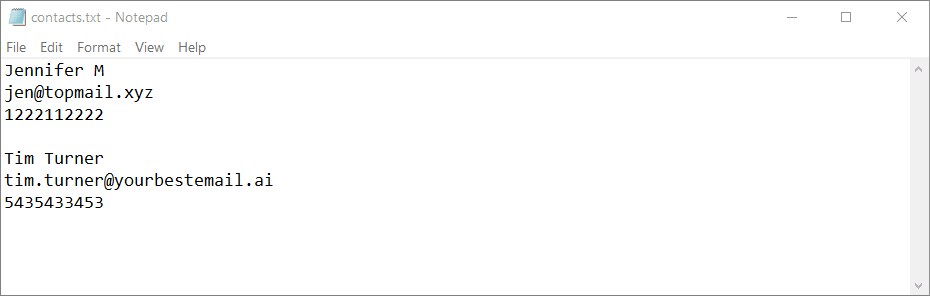
Welcome back! This time we will write the code for a basic agenda, a plain text file which can store people's names, email addresses and phone numbers. Just like with our previous project, you will have to create a contacts.txt file inside the project folder.
And this is the code that makes it happen.
import os
def main():
# open contacts.txt for writing
contacts_file = open('contacts.txt', 'w')
# repeat until the user presses the "n" key
while True:
# ask the user to input a name
name = input('Enter a name: ')
# ask the user to input an email
email = input('Enter an email: ')
# ask the user to input a phone number
phone = input('Enter a phone number: ')
# write the name, email, and phone number to contacts.txt
contacts_file.write(name + '\n')
contacts_file.write(email + '\n')
contacts_file.write(phone + '\n')
# write a new line (similar to an "Enter" key press) to contacts.txt
contacts_file.write('\n')
# ask the users if they want to continue
choice = input('Do you want to continue? (y/n): ')
# if the user does not want to continue, break out of the loop
if choice == 'n':
break
# close the file
contacts_file.close()
main()
I know it's a bit more complex, but I have added comments (the lines that start with #) inside it. Basically, we open the existing contacts.txt file for writing, and then we use a "while" loop, asking the user to provide a name, an email address, and a phone number. Then, the data is written in the text file.
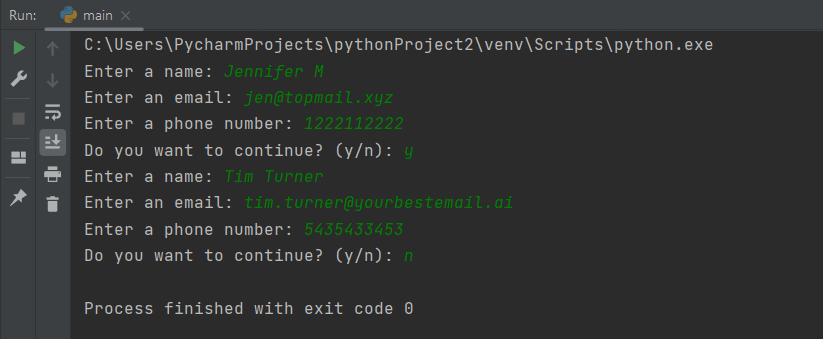
Here's what happens when you run the code; I have input the data for two people, but you can add an unlimited number of entries.